GNCC 2K Indoor Security Cameras vs GNCC 2K Security Camera
We compare the GNCC 2K Indoor Security Cameras and the GNCC 2K Security Camera across every dimension that matters - our scores, the key specs, and how each performs on the things you will actually notice day to day.

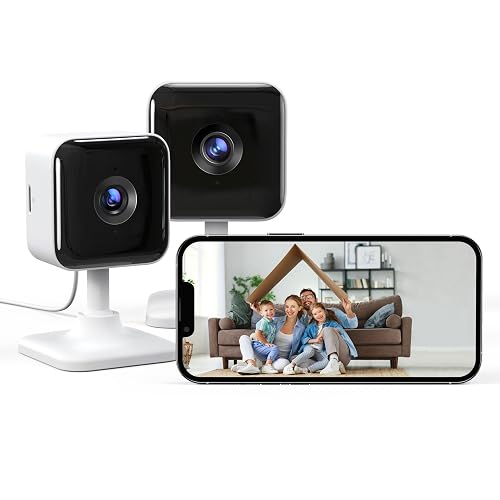
At a glance
| GNCC 2K Indoor Security Cameras | GNCC 2K Security Camera | |
|---|---|---|
| Our score | 8.0/10 | 7.1/10 |
| Best for | Keeping an eye on your home | Keeping an eye on your home |
| Not ideal for | Buyers who want to avoid any subscription, unless it also records to local SD | Buyers who want to avoid any subscription, unless it also records to local SD |
| Brand | GNCC | GNCC |
Video Quality and Resolution
GNCC 2K Indoor Security Cameras
With a stated 2K resolution, this security camera are designed to capture clearer detail than standard definition models. In practical use, higher resolution generally improves the visibility of facial features, pet markings and room objects when footage is viewed closely or paused, with the camera setup offering both cloud and SD storage options. Recorded clips can be rechecked later using the chosen storage method. Image sharpness still depends on lighting conditions and network stability, and no specific bitrate or sensor performance details are provided. Overall, 2K should improve basic identification, though results vary.
GNCC 2K Security Camera
With 2K video resolution, this security camera indoor camera is designed to capture more detail than basic HD. This can make fine features easier to discern when reviewing footage, rather than only seeing general shapes. However, actual sharpness depends on factors such as lighting conditions and connection stability. Not stated: the bitrate, lens specification, and frame rate, so performance limits cannot be fully assessed. For best results, viewing distance should be tested.
Day and Night Vision
GNCC 2K Indoor Security Cameras
Even though the GNCC are made for indoor use, their day and night performance depends largely on the stated infrared night vision. During the day, the 2K sensor captures clear colour images, supporting more accurate motion and person detection. As light levels drop, infrared illumination enables night viewing, although visibility can be affected if the camera's range is limited or if reflective surfaces, such as nearby windows, are in view. For best reliability, check that the night image remains usable at the typical distances around the home, because weak infrared contrast can reduce detection performance.
GNCC 2K Security Camera
During day and night use, the GNCC indoor camera is designed to deliver visibility around the clock. During daylight, it relies on normal ambient light for monitoring. In low light, it switches to infrared illumination to support night viewing without visible lights. This enables movement and event detection in dimly lit rooms. Infrared performance can be affected by distance and indoor obstructions such as walls, curtains, or reflective surfaces, so lighting and camera angles should be checked under evening conditions for best results.
Power and Placement
GNCC 2K Indoor Security Cameras
Power and placement shape how consistently the security camera can stream and record while the day/night vision and detection features operate as expected. Each camera needs a stable indoor power source, so positioning should begin near a suitable socket and extension cords should be avoided where possible. For reliable viewing, mount the camera at around chest to head height, then angle it to cover doorways, hallways, or pet areas. Wi-Fi routing also affects performance, because thick walls and metal furniture can weaken the 2.4G signal, which may lead to delays, particularly at night.
GNCC 2K Security Camera
Power and placement matter because a wired or stable power connection is usually what keeps an indoor 2K camera functioning reliably. The security camera uses 2.4G WiFi, so it needs a location with a workable wireless signal. Mounting near a power outlet helps minimise the need for extension cables. For placement, mounting at about head height for faces is recommended, with the camera aimed slightly downward to help reduce glare from lights. Corners can cover more area, but they may miss side movements. The camera should be kept away from steam or direct heat, as indoor conditions can vary.
Storage and Subscription
GNCC 2K Indoor Security Cameras
Storage and subscription determine how the GNCC store footage after motion is detected, and how clips are reviewed later in the app. The system supports cloud or SD storage, allowing recorded events to be saved to the chosen location. When motion occurs, the camera can write recordings to that selected storage, and the clips then appear in the app for later viewing. With SD storage, events are stored locally on the memory card, avoiding reliance on the cloud, but card capacity limits apply.
GNCC 2K Security Camera
Storage and subscription affect how consistently the GNCC Security Camera 2 Pack records usable footage during unstable WiFi or busy periods with frequent motion alerts. The product title indicates SD and cloud support, so recordings can be saved locally to an SD card and also sent online. If WiFi drops, local SD storage can still preserve motion or sound clips, while cloud syncing may not keep pace. With frequent motion events, local storage can fill faster, so buyers should consider how long they want events retained.
Smart Detection and Alerts
GNCC 2K Indoor Security Cameras
Smart detection and alerts on the security camera help reduce the need to review random motion recordings. The cameras include motion detection and person detection, so events can be narrowed to movement that is more likely to involve a person rather than every passing change in the room. Alerts are delivered through the app, and the camera supports both cloud and SD storage for later checks. Detection accuracy depends on conditions, so false alerts can still occur.
GNCC 2K Security Camera
Smart detection and alerts are central to the GNCC Indoor Camera 2K Security Camera 2 Pack, as it supports both motion and sound detection with real-time alerting. The camera can monitor for movement and noise, then send timely notifications, which helps households respond quickly when activity occurs. In everyday use, this can reduce the need to constantly check live video, although false alerts can still occur if detection settings are set too sensitively. Alert performance depends on the camera's indoor placement, since the room layout and positioning affect what the sensor detects. Event review is also influenced by the available storage options, including cloud recording and SD storage, which determine where motion and sound events are stored and accessed later.
Two-Way Audio and Siren
GNCC 2K Indoor Security Cameras
Two-way audio is listed on the GNCC 2K Indoor Security as a feature, with audio support described in the product title. This allows a user to listen in and speak back through the app. It is useful for checking on pets or guests without being in the room, because the person monitoring can respond immediately. The camera must be connected to WiFi, and audio quality can vary with room acoustics and distance since the product does not specify microphone or speaker strength.
GNCC 2K Security Camera
Two-way audio is one of the day-to-day features of the GNCC Indoor Camera 2K (2-pack). It lets someone at home talk through the camera while hearing what is happening indoors, which can help confirm what triggered a motion or sound alert. However, the available product information does not specify a built-in siren, siren volume, or any alarm pattern, so the feature set should be understood as audio communication rather than an audible alarm. For night situations, infrared night vision helps visibility, but audio effectiveness depends on room acoustics.
App and Setup
GNCC 2K Indoor Security Cameras
Setup for the GNCC starts with connecting each camera to the home network, as they are described as WiFi cameras that work on 2.4G WiFi only. Using the companion app, the user typically powers each indoor unit, then scans or enters the device details to pair it with the phone. If the home WiFi is set to mixed bands, the camera will still require a 2.4G signal, so selecting the correct network may be necessary. After pairing, notifications and motion alerts can be tested, then storage choices can be set for cloud or SD. The system works with Alexa for basic voice control.
GNCC 2K Security Camera
Once the GNCC indoor camera is physically placed indoors, setup typically starts in the app. The owner connects the camera to a 2.4G WiFi network and names the device for easier control. After pairing, the app lets users confirm the connection and activate alerts for motion and sound detection, where supported by the camera's features. The camera should be positioned within reliable WiFi range, because a weak signal can cause delays in real-time notifications. Storage options include both SD and cloud, and the app may prompt users to configure them. If pairing fails, restarting the camera and retrying the network selection can help.
Who Is This Security Camera For?
GNCC 2K Indoor Security Cameras
Who is the GNCC 2K Indoor Security Camera for, and what kind of home situation does it fit best? It is aimed at people who want indoor coverage with a WiFi camera, with positioning that specifically references a pet dog. The two-camera pack format suits smaller homes or rooms where you want coverage across two key areas, such as entry points or living spaces. Infrared night vision supports low-light checks. Two-way audio, along with motion and person detection, enables remote interaction. It supports only 2.4G WiFi, so it may require adjustment for households using newer WiFi settings.
GNCC 2K Security Camera
This camera is aimed at people who want an indoor, budget-friendly way to monitor a home and manage alerts from a phone, with motion and sound detection as key features. It is built for clear viewing during the day and at night, offering 2K video and infrared night vision. Two-way audio supports talk-back functionality rather than listening-only monitoring. Real-time alert notifications are supported, with recording options that include SD and cloud storage, and it also supports 2.4G WiFi. It is not the best match for buyers who need outdoor coverage or more advanced specifications that are not stated.
GNCC 2K Indoor Security Cameras: pros
- 2K video
- Infrared night vision
- Two-way audio to talk and listen
Cons
- Cloud recording and longer history usually need a paid subscription
- As a Wi-Fi camera, reliability depends on your home wireless signal at the mounting spot
- Wired power means it must be mounted near a socket or hardwired
GNCC 2K Security Camera: pros
- 2K video
- Infrared night vision
- Two-way audio to talk and listen
Cons
- Cloud recording and longer history usually need a paid subscription
- As a Wi-Fi camera, reliability depends on your home wireless signal at the mounting spot
- Wired power means it must be mounted near a socket or hardwired
Our verdict
Our pick is the GNCC 2K Indoor Security Cameras (our score 8.0/10) - A practical security camera (2K) for home security, with phone alerts and infrared night vision. The GNCC 2K Security Camera is still worth it if it is cheaper when you check, or if it better matches your specific needs.